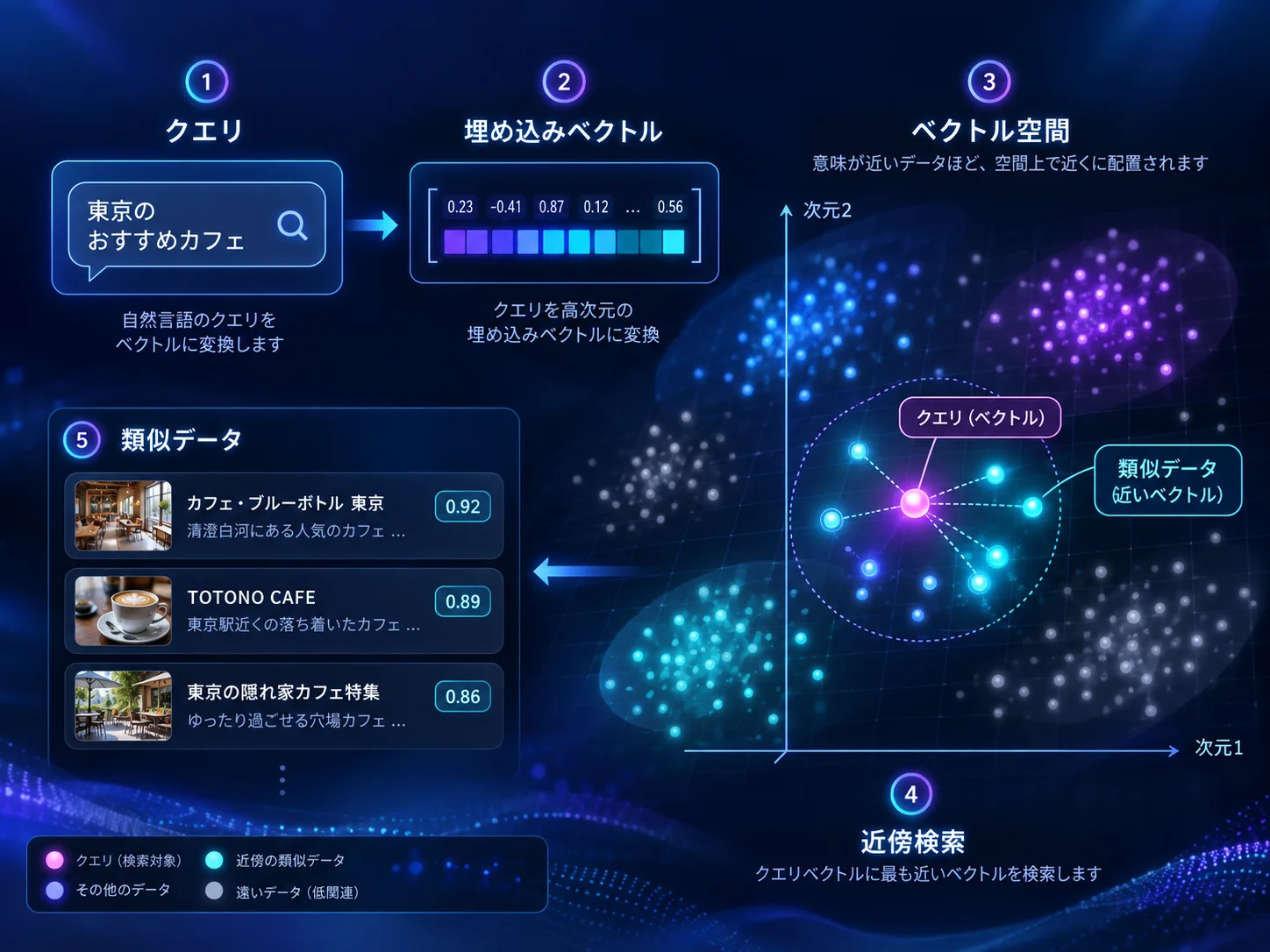
What Exactly is a Vector?#
When most people first hear the word "vector," they might not have any idea what it means. High school students in science tracks might vaguely remember it from math classes (algebra/geometry), but for humanities backgrounds, it might sound completely unfamiliar. The easiest way to intuitively understand a vector is by thinking of a map.
Imagine having a map in front of you and drawing a line from Tokyo Station to Ikebukuro Station. In short, that is the basic concept of a vector. If you turn this into numbers, it is an arrowed diagonal line drawn across a rectangle that is 3 cm wide and 5 cm high. In essence, a vector represents direction and magnitude from one point to another. In the case of a map, it is 2-dimensional (horizontal and vertical), but adding height makes it 3-dimensional, which is widely used in physics to describe the displacement of objects.
Doraemon's 4D pocket is probably based on 4 axes: length, width, height, and time (in Einstein's relativity, the 4th axis is time, though in Doraemon it might be a disjoint 4D space). Now, by holding multiple values beyond just 3 cm horizontal and 5 cm vertical, we can theoretically express multidimensional vectors. 3D is easy to grasp because it is our physical world, but determining the number of dimensions—such as 1024, 1536, or 4096 dimensions—as a granularity standard results in far more precise vectors. For such high dimensions, it is best understood simply as a mathematical representation. Trying to visualize it like physical 3D space can be confusing. Just remember that it represents "direction and quantity".
It's Actually Used in Modern AI (LLMs) Too#
A major breakthrough in modern AI technology was vectorizing text. Transforming text into vectors rather than isolated words makes it computationally easier to predict and generate the next sentence—which is the core of Large Language Models (LLMs). Similarly, in vector search, managing the semantic meaning of sentences as single vector data points significantly improves search accuracy and allows LLMs to accurately grasp context.
Note that this applies to text AI; image generation AI uses entirely different principles such as Diffusion Models, so feel free to look into that separately if interested.
Current Specification Docs & Architecture#
Currently, the Kurousagi development environment is built on Cloudflare, using Cloudflare D1 (an SQLite-based database) to manage specification documents. Initially, specs were stored as Markdown (.md) or HTML files within repositories. However, developing multiple products and libraries caused specs to scatter everywhere, leading to outdated, duplicated, or conflicting documents that became very difficult to manage.
Therefore, as described in our previous article, we consolidated repositories into a monorepo approach and built an internal developer portal system. Editing and creating specs via APIs and browser interfaces allowed unified management, filtering, and extraction, making it effortless to find specs created anywhere.
However, in modern AI-driven development workflows, having AI search through individual specs repeatedly wastes tokens (usage quota). Therefore, when introducing full-text search, we incorporated vector search to further boost convenience—which is the primary goal of this architecture.
Basic Mechanism#
As mentioned earlier, specification text is stored in the D1 database. To complement this, we adopted Cloudflare Vectorize, a dedicated vector database service. We extract text from D1, process it with Cloudflare Workers AI, and store it as vector embeddings in Cloudflare Vectorize (referred to as CF Vectorize).
Cloudflare Workers AI Free Tier
- Up to 10,000 Neurons free per day per account across Workers AI
- Pay-as-you-go for usage beyond the free quota
- Free quota resets daily at UTC 00:00 (09:00 JST)
- Not exclusive to BGE-M3; shared across all Workers AI models in the account
For embeddings, we use the @cf/baai/bge-m3 model. This model converts semantic meaning into numerical vectors. Since BGE-M3 is multilingual, Japanese specifications and Japanese search queries can be placed in the exact same numerical vector space.
Cloudflare Vectorize Free Tier
- Storage: Up to 5 million vector dimensions
- Queries: Up to 30 million vector dimensions per month
- Overages: No overage billing (upgrading to Paid plan required for continued usage once limits are reached)
- Egress, CPU, and index maintenance time: No additional charges
Since the Kurousagi account is on a Paid plan, it easily fits within the 10 million dimensions storage quota, but it would exceed the typical free tier limit. The fundamental workflow is straightforward: a scheduled cron job extracts updated specification text from D1 using Workers AI, vectorizes the text, and registers it into the Vectorize database. During search, the query text is vectorized via Workers AI, matched against Vectorize using the computed vector, and matching specifications are retrieved from D1 and presented to the user.
User Experience & Impressions#
Our impression after introducing vector search: super convenient! Normally, keyword searches require specific terms like "device" or "lost", but now natural phrasing like "accounts when a device is lost" instantly surfaces the relevant specification list. However, because the free tier capacity is relatively small, handling large volumes of text strictly within Cloudflare Vectorize's free tier would be challenging.
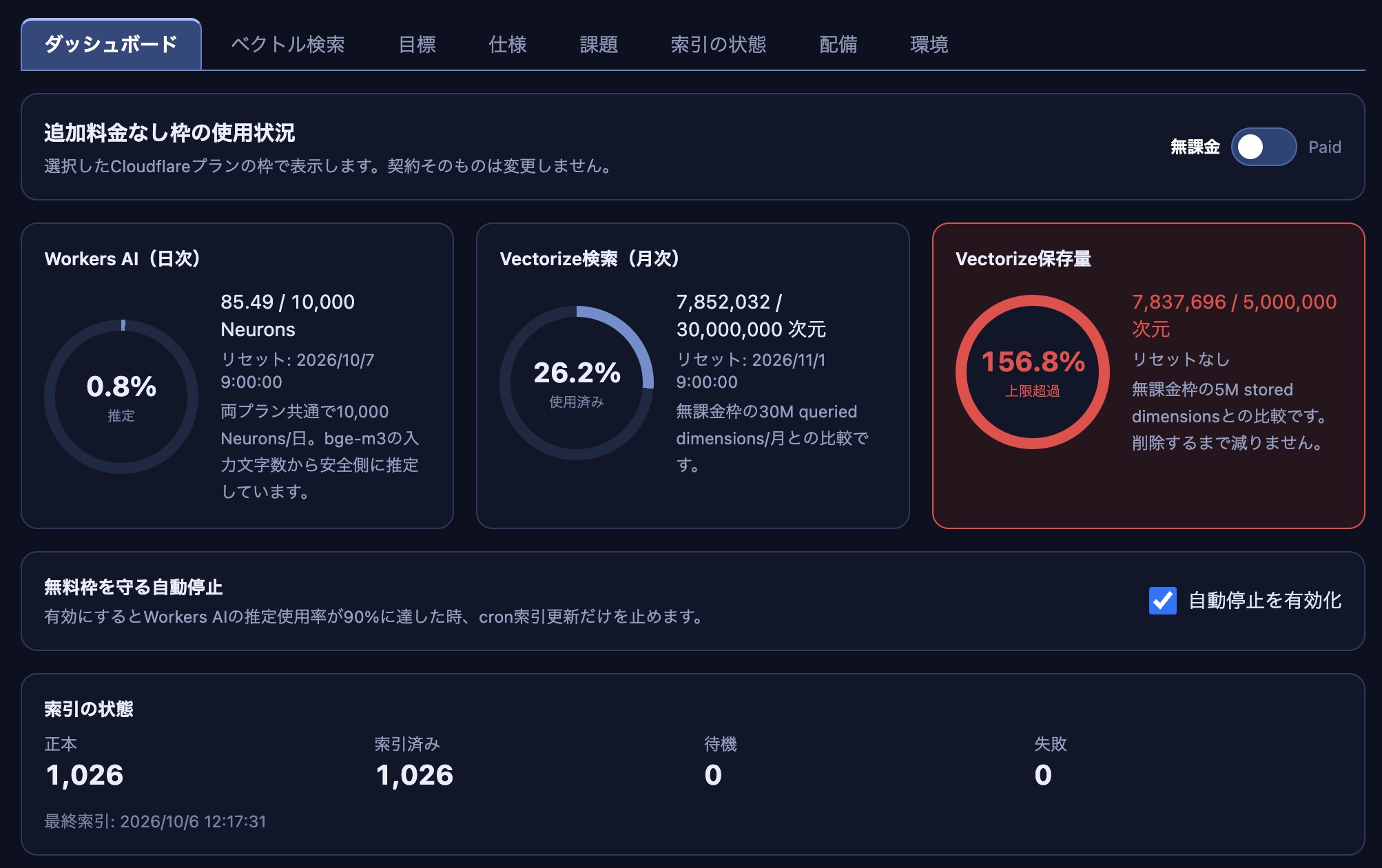
This screenshot shows the vector search management dashboard we built, clearly indicating that it has already exceeded the free tier quota. While Workers AI resets daily (allowing search loads to be balanced across days), vector data persists and cannot be simply reduced, inevitably causing overages.
Frankly, while it is a fantastic tool for those already on a Paid plan, relying solely on the free tier requires careful consideration. We hope this serves as a helpful reference for anyone planning to build vector databases on Cloudflare.